
Zoho Development Services in the USA: A Complete Guide
MV Clouds Analysis
Zoho development services help U.S. businesses customize CRM workflows, automate tasks, and connect business applications.
Zoho CRM customization supports business-specific sales processes, reporting, and user requirements.
Integrations and data migration help connect systems and improve data management.
Development costs depend on project complexity, integrations, migration, and ongoing support.
Choosing the right Zoho development partner requires technical expertise, clear communication, data security, and reliable support.
MV Clouds provides Zoho CRM customization, workflow automation, integrations, data migration, testing, and ongoing support.
A law firm case study highlights a 60% reduction in manual work through Zoho CRM automation and integrations.
For many U.S. businesses, Zoho provides applications for managing sales, customer relationships, finance, marketing, and daily operations. However, standard settings do not always support every business process.
That is where Zoho development services can help. A Zoho development partner can customize applications, automate workflows, connect Zoho with other business systems, migrate data, and build solutions for processes that cannot be handled through standard settings alone.
For businesses in the United States, choosing the right development approach involves more than adding new features. It means understanding which processes need improvement, whether standard Zoho functionality is sufficient, and how to build a solution that remains easy to manage as the business grows.
This guide explains Zoho development services, common business use cases, integrations, project costs, implementation timelines, and what U.S. businesses should consider when choosing a Zoho development partner.
What Are Zoho Development Services?
Zoho development services involve customizing, extending, integrating, and maintaining Zoho applications to support specific business requirements.
Depending on the project, development can include:
Zoho CRM customization
Custom modules, fields, and layouts
Workflow and process automation
Custom functions and business logic
API and third-party integrations
Data migration
Custom reports and dashboards
Zoho Creator application development
User roles and access configuration
Testing, deployment, and ongoing support
For example, a U.S. consulting company may want to connect lead management with proposal preparation, contract signing, and client onboarding. Zoho can be configured and extended to manage these activities within a more organized workflow.
The goal is to make Zoho support your business processes without introducing unnecessary customization or maintenance work.
Why Do U.S. Businesses Need Zoho Development?
A business may start with standard Zoho functionality and later discover that its processes are more complex than expected.
For example, a sales team may need a custom qualification process, an operations team may need information from another application inside Zoho, or management may require reports combining data from several business functions.
Common reasons businesses seek Zoho development services in the USA include:
Standard Zoho settings do not support a specific business process.
Customer information is spread across different applications.
Employees manually transfer information between systems.
Sales teams need customized lead and opportunity processes.
Managers need reporting based on business-specific metrics.
Existing business applications need to exchange data with Zoho.
A company is moving from another CRM and needs data migration.
Different departments require connected but customized workflows.
Custom development should solve a defined business problem. Adding customization simply because it is technically possible can make a CRM harder to maintain.
What Does Zoho CRM Development Include?
Zoho CRM development can cover everything from relatively simple configuration changes to more complex integrations and custom business logic.
Zoho CRM Customization
A development team can customize Zoho CRM to reflect how your business manages customers, sales activities, and internal processes.
A development team can customize areas such as:
Modules and fields
Page layouts and validation rules
Sales pipeline stages
Workflow rules and approval processes
Custom functions
User roles and permissions
Reports and dashboards
For example, a U.S. professional services company may need a sales process that includes lead qualification, consultation, proposal, contract review, and client onboarding. Instead of maintaining these steps through spreadsheets or email, the workflow can be structured inside Zoho CRM.
Workflow Automation
Workflow automation helps reduce repetitive administrative tasks and makes business processes more consistent.
Depending on the requirements, an automated workflow could:
Capture a new lead from a website or another connected application.
Assign the lead based on territory, industry, or predefined rules.
Assign the sales representative a follow-up task.
Send a notification when action is required.
Update the CRM record when a specific condition is met.
Trigger the next step when an opportunity reaches a defined stage.
The workflow should account for exceptions, missing information, and situations that require employee approval.
Custom Functions
Some business requirements need more logic than standard workflow settings provide.
Zoho custom functions can support tasks such as calculating values, updating related records, applying business rules, and communicating with external applications.
For example, a business might need to update related CRM records when an opportunity changes stage or send selected information to another application after a deal is approved.
Custom functions should be tested, documented, and reviewed periodically so that future administrators and developers can maintain them.
Zoho Integrations for USA Business
Many businesses do not operate entirely inside one CRM. They may use separate applications for accounting, marketing, customer support, payments, communication, analytics, or internal operations.
Zoho development can help connect these systems where appropriate.
Business Application → API/Integration Layer → Zoho → Automated Workflow
For example, when information changes in one system, the integration may update the corresponding Zoho record instead of requiring an employee to enter the information manually.
Before implementing an integration, businesses should evaluate:
Available APIs
Authentication requirements
Data fields that need to be synchronized
One-way vs. two-way synchronization
Error handling
Duplicate management
Sync frequency
Data ownership
Security requirements
Not every system needs real-time synchronization. In some cases, scheduled updates are sufficient and easier to maintain.
Zoho Data Migration
Data migration is another common requirement when a company adopts Zoho or restructures its existing CRM.
Moving data without reviewing it first can transfer old problems into the new system. A structured migration process is therefore important.
A Typical Zoho Migration Process Includes:
1. Data assessment: Review existing records, fields, duplicates, formats, and data quality.
2. Data mapping: Determine how existing fields correspond to Zoho fields and modules.
3. Data cleansing: Remove duplicates, correct inconsistent formats, and identify incomplete records.
4. Migration: Move approved data into the appropriate Zoho applications.
5. Validation: Compare migrated information against the original data and test key workflows.
6. Final deployment: Complete the transition and monitor the system after launch.
For U.S. businesses, migration planning may also need to account for contractual, privacy, security, retention, or industry-specific requirements that apply to their particular data and operations.
Zoho Development Use Cases by Industry
The right customization depends on how each industry manages customers, transactions, employees, and operational processes.
Healthcare
Healthcare organizations may need structured workflows for inquiries, customer communication, scheduling, service coordination, and reporting.
Where regulated or sensitive information is involved, the business should evaluate applicable privacy and compliance requirements before deciding what information should be stored or processed within a particular system.
Real Estate
Real estate businesses can use Zoho development to organize:
Lead capture
Property inquiries
Agent assignment
Follow-ups
Viewing schedules
Opportunity stages
Customer communication
Sales reporting
Custom workflows can help connect lead management with the organization's broader sales process.
Professional Services
Consulting, legal, accounting, and other professional service businesses may need workflows connecting:
Lead → Consultation → Proposal → Contract → Client Onboarding → Ongoing Service
Zoho can be customized to track these stages and automate tasks between teams.
Manufacturing
Manufacturing companies may require customized processes for:
Distributor management
Sales opportunities
Customer accounts
Product information
Sales follow-ups
Order-related workflows
Management reporting
The exact implementation depends on the company's existing ERP, CRM, and operational systems.
Financial Services
Financial organizations may need structured lead management, document workflows, approvals, communication tracking, and reporting.
Because regulatory requirements vary by organization and activity, compliance requirements should be assessed during the solution-design stage rather than treated as an afterthought.
E-commerce and Retail
Retail and e-commerce businesses in the USA can integrate Zoho CRM with platforms such as Shopify, WooCommerce, BigCommerce, Wix, Magento (Adobe Commerce), Amazon, and eBay to manage customer information, track orders, and coordinate sales follow-ups.
Businesses can also connect Zoho CRM with QuickBooks Online for accounting, Sign Any 2.0 and Zoho Sign for digital signatures, Microsoft 365 and Google Workspace for email and calendar management, Mailchimp and Klaviyo for email marketing, Slack for team communication, and Zendesk for customer support. Payment platforms such as Stripe and PayPal can also be connected where supported to help manage payment-related information and business workflows.
These integrations can help businesses reduce manual data entry, keep customer information organized, and coordinate sales, marketing, payments, and customer support more effectively. Integration options depend on the applications used and may require third-party connectors or custom API development.
Zoho Development vs. Standard Zoho Configuration
One of the most important decisions is determining whether a requirement actually needs development.
| Standard Configuration | Custom Development |
|---|---|
| Uses available Zoho settings | Extends functionality beyond basic configuration |
| Suitable for straightforward requirements | Suitable for specialized business logic |
| Generally quicker to implement | Requires development and testing |
| Lower technical complexity | Higher maintenance considerations |
Works within available platform capabilities
Can address more complex requirements
A good Zoho development company should not recommend custom development for every requirement.
If a workflow can be handled through standard configuration, that may be the better approach. Development becomes more appropriate when the business has a genuine requirement that cannot be addressed effectively through available functionality.
How Does a Zoho Development Project Work?
A structured development process can reduce implementation problems and unnecessary rework.
1. Requirement Discovery
The first step is understanding how the business currently works.
This includes identifying:
Business objectives
Existing applications
Current workflows
Manual processes
User roles
Data requirements
Integration requirements
Reporting needs
2. Solution Planning
The development team maps business requirements to the relevant Zoho applications and determines what should be configured, customized, integrated, or developed.
3. Development and Configuration
The agreed solution is then configured and developed.
This may include CRM customization, automation, custom functions, integrations, dashboards, or application development.
4. Testing
Testing should cover both normal workflows and exceptions.
For example:
What happens when required data is missing?
What happens when an integration fails?
Can the correct users access the record?
Are duplicate records created?
Do automated notifications trigger correctly?
5. User Acceptance Testing
Business users should test the solution using realistic scenarios before deployment.
6. Deployment and Support
After approval, the solution can be deployed. Post-launch monitoring and support can help identify issues that only become visible once users begin working with the system regularly.
How Long Does Zoho Development Take?
There is no single implementation timeline that applies to every Zoho project.
A small CRM customization may require considerably less work than a project involving multiple applications, integrations, data migration, and custom business logic.
The timeline generally depends on:
Project scope
Number of Zoho applications involved
Number of users and departments
Data volume and quality
Integration complexity
Customization requirements
Testing requirements
User acceptance process
For this reason, businesses should request a scope-based estimate rather than relying on a generic implementation timeframe.
How Much Do Zoho Development Services Cost in the USA?
The cost of Zoho development services in the USA varies according to the project's technical and business requirements.
Several factors can influence the total cost, including:
Number of customizations
Development complexity
Number of integrations
Data migration requirements
Number of users
Number of applications involved
Automation requirements
Reporting requirements
Training and support
Ongoing maintenance
Zoho development work may be priced using different models.
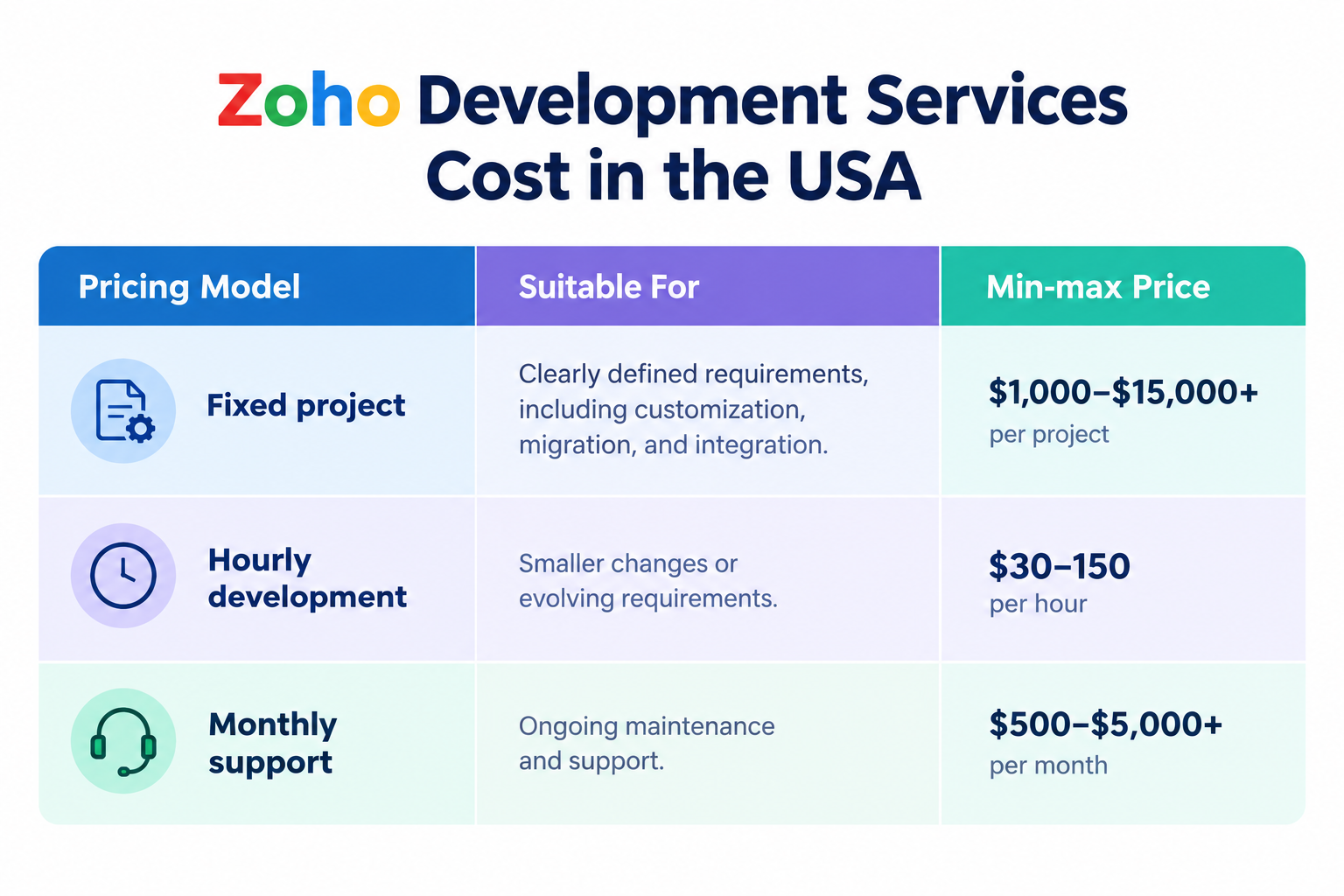
Businesses should request a quote based on their requirements and compare the proposed scope, deliverables, timeline, and support arrangements.
For U.S. companies considering an offshore development team, compare total project cost, communication arrangements, technical expertise, and maintenance needs not just the hourly rate.
How to Choose an Offshore Zoho Development Partner?
For U.S. businesses, choosing an offshore Zoho development partner requires evaluating more than technical skills. Consider these key factors before making a decision:
Zoho Experience: Experience with the Zoho applications relevant to your business.
Communication: Clear timelines, regular updates, and suitable time-zone overlap.
Technical Capabilities: Expertise in integrations, data migration, and custom development.
Data Security: Appropriate access controls and safeguards for business information.
Documentation and Testing: Defined processes for testing and documenting custom solutions.
Ongoing Support: Clear arrangements for maintenance, troubleshooting, and future updates.
These factors can help you evaluate whether a provider can support your project and long-term business needs.
Case Study: Zoho CRM Lead Management for a Law Firm 60% Less Manual Work
Client: Law Firm
Services: Zoho CRM Development, Workflow Automation, and Third-Party Integrations
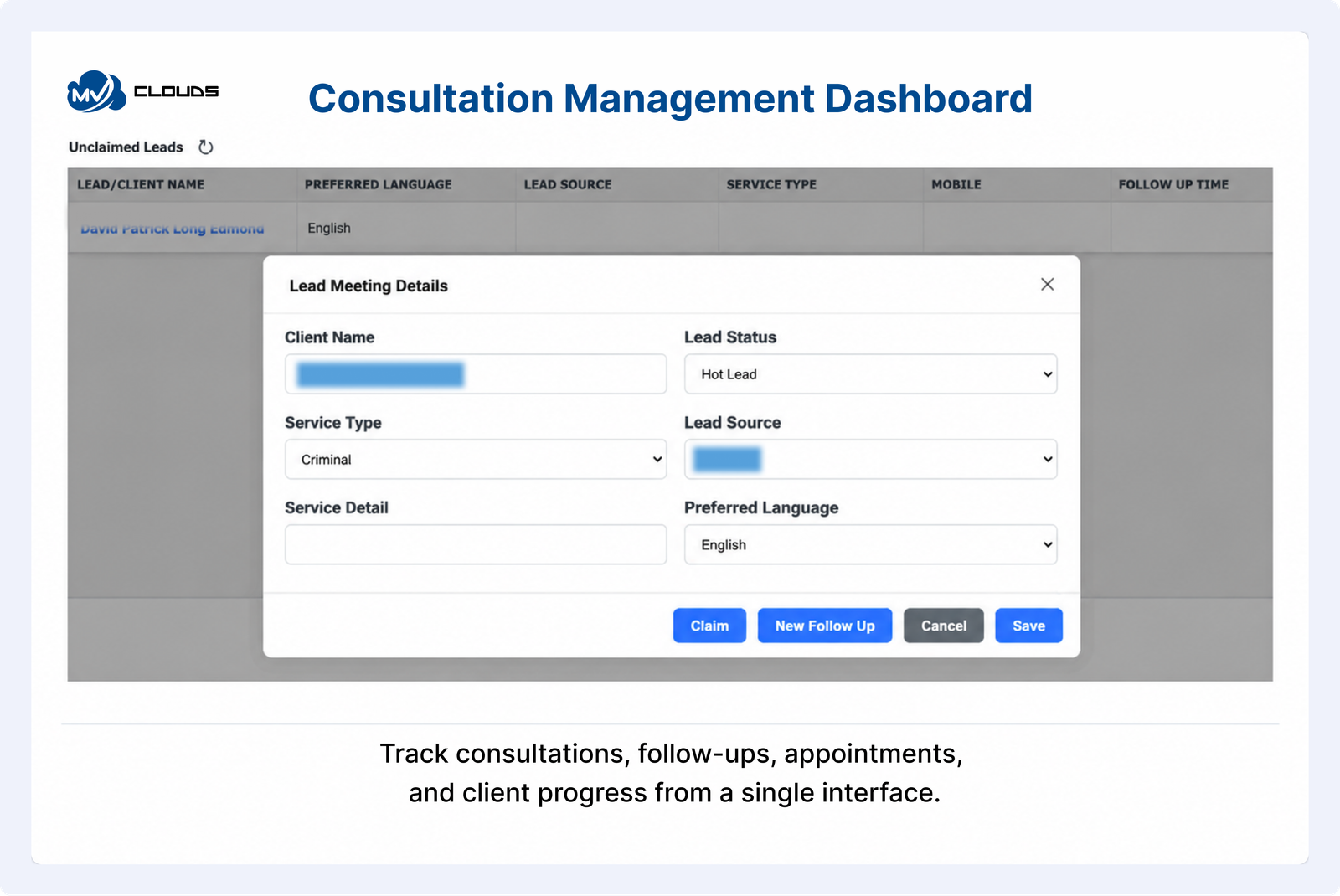
Challenge: The firm needed a more organized way to manage incoming leads, schedule consultations, track follow-ups, and manage retainers across multiple teams.
Solution: MV Clouds implemented customized Zoho CRM with custom widgets, RingCentral, and Sinch SMS integration. Automated confirmations, reminders, follow-up tracking, and role-based dashboards improved coordination between call center agents, consultants, and front desk staff.
Result: The solution reduced manual work by 60%, helped reduce missed appointments, and improved visibility across the client journey.
How Does MV Clouds Approach Zoho Development?
At MV Clouds, we start by understanding your business processes, goals, and challenges before recommending a Zoho solution. Our aim is to improve daily operations, manage data effectively, and reduce repetitive manual work without unnecessary complexity.
For U.S. businesses, an offshore Zoho development team can provide technical expertise, flexible development support, and cost-effective solutions. We prioritize clear communication, well-defined requirements, and solutions that fit your business needs.
Business Requirement Analysis: Assess business processes, goals, and technical needs to identify suitable Zoho solutions.
Zoho CRM Customization: Configure modules, fields, layouts, sales pipelines, and rules around your workflows.
Workflow Automation: Automate lead assignments, reminders, record updates, notifications, and approvals.
Integration and Data Migration: Connect business applications and transfer existing data accurately.
Testing and Quality Assurance: Check functionality, data accuracy, workflows, and integrations before launch.
Deployment and Ongoing Support: Support launch, resolve technical issues, and maintain the solution as needs evolve.
Our goal is to help businesses get more value from Zoho without introducing unnecessary customizations or maintenance challenges. Whether you need CRM improvements, workflow automation, data migration, or application integrations, MV Clouds can help identify a practical development approach.
Planning a Zoho development project? Discuss your business requirements with MV Clouds and explore potential solutions.Contact MV Clouds.
Final Thoughts
Zoho can support many business processes, but effective implementation depends on how an organization operates. Zoho development services can help U.S. businesses customize CRM workflows, automate repetitive tasks, connect applications, and address requirements that standard configuration cannot meet.
The most effective approach is not to customize everything. Start with the business requirement, identify what Zoho already supports, and introduce custom development only when it provides a clear operational benefit.
For U.S. businesses planning a Zoho implementation or improving an existing setup, an experienced Zoho development partner can help translate business requirements into a structured, maintainable solution.
Frequently Asked Questions
1. What are Zoho development services?
Zoho development services consist of customizing, extending, integrating, and maintaining Zoho applications to meet specific business needs. Services include CRM customization, automation, integration, data migration, custom functions, and application development.
2. What does a Zoho CRM developer do?
A Zoho CRM developer customizes the CRM according to business requirements, including modules, workflows, custom functions, integrations, data migration, and reporting.
3. How much do Zoho development services cost in the USA?
There is no standard price for every project. Costs depend on the applications involved, customization requirements, integrations, migration needs, development complexity, and ongoing support.
4. How long does Zoho development take?
A Zoho development project typically takes 4–12 weeks, depending on its scope and complexity. Basic CRM customization may take a few weeks, while complex implementations can take several months.
5. Is Zoho development different from Zoho CRM customization?
Yes. CRM customization generally involves configuring existing platform features, while development may include custom functions, API integrations, and custom solutions. Some requirements can be handled through configuration alone.
6. Can Zoho integrate with other business applications?
Yes. Zoho applications can connect with external systems through available integrations, APIs, and custom development. The best approach depends on the systems involved and the data being exchanged.
7. What should I look for in a Zoho development company?
Look for experience with relevant Zoho applications, integration and migration capabilities, a clear testing process, proper documentation, transparent project scope, and post-launch support.
8. When does a business need custom Zoho development?
Custom Zoho development may be necessary when standard configuration cannot meet specific business requirements, such as complex integrations, custom applications, or advanced workflows.
